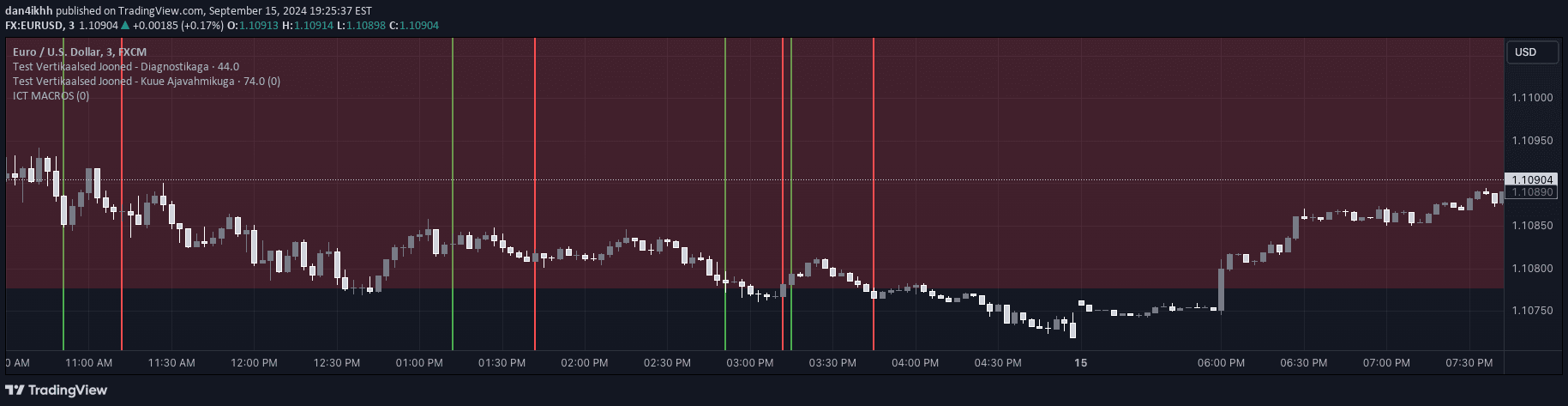
A custom TradingView indicator that highlights configurable time windows around H1 candle closes, helping traders visualize potential market reaction zones during hourly transitions.
Explore complementary indicator rolesHow it works
The H1 Candle Time Box indicator creates a transparent box around the hourly candle close, extending 15 minutes before and after the close by default. Traders can customize the time window width to suit their specific trading strategy and market analysis needs.
The indicator dynamically positions these boxes slightly above price candles to prevent visual overlap, ensuring clear visibility. It automatically limits the number of recent boxes displayed (default: 5) to maintain chart clarity and prevent visual clutter.
Why it may be useful
Time-based market analysis can reveal critical insights into potential price movements and trader psychology during key transition periods. By highlighting specific time zones around hourly candle closes, traders can identify potential areas of market activity and potential trend shifts.
This visualization helps traders anticipate potential market reactions, supporting more informed decision-making by providing a structured view of temporal trading patterns. The customizable nature of the indicator allows traders to adapt the tool to different market conditions and personal trading styles.
When to explore it
The H1 Candle Time Box is most effective for intraday traders focusing on short-term price movements and market transitions. It works best on 1-minute charts where precise timing can be crucial for identifying potential entry and exit points.
Traders can utilize this tool during periods of high market volatility or when analyzing specific market sessions with predictable trading patterns. It is particularly useful for traders who want to understand market behavior around key hourly closes and potential reaction zones.
Keep exploring
What we’ve verified
Access, alerts and repainting behaviour have not been independently verified for this indicator. Check the creator’s current publication and settings.
General descriptions and classifications are recovered research. Verified details above identify the specific checks we have completed. Check the creator’s current publication for later changes.