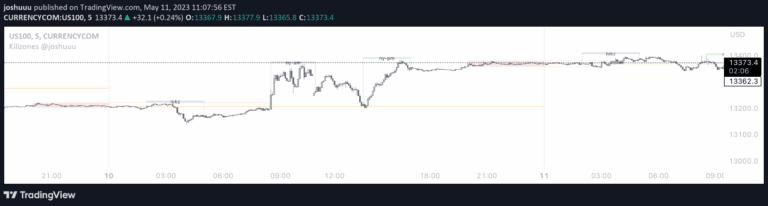
A customizable trading indicator designed to identify ICT Killzones and track high and low price pivots during specific market sessions with configurable time windows.
Explore complementary indicator rolesHow it works
The indicator identifies five customizable Killzones or trading sessions with specific time windows. During each session, it automatically tracks and records the highest and lowest price points.
These price pivots are then extended and tracked until they are invalidated by subsequent market action. Users can modify session times and add optional open price lines and vertical timestamps. A cutoff time feature helps maintain chart clarity by preventing excessive drawing overlaps
Why it may be useful
This indicator provides traders with a structured approach to analyzing market sessions and price dynamics. By identifying key price levels and tracking their progression, traders can gain insights into potential support and resistance zones.
The customizable nature allows traders to adapt the tool to their specific trading style and market preferences. It helps in understanding market structure, session dynamics, and potential entry and exit points
When to explore it
The indicator is most effective during active trading hours with consistent market movements. It works best for traders who focus on intraday and swing trading strategies. Ideal for markets with clear session boundaries like forex, futures, and stocks.
Traders can use it to identify potential breakout points, track session highs and lows, and understand market structure. Most effective when combined with other technical analysis tools and a comprehensive trading strategy
Keep exploring
What we’ve verified
Reviewed 2026-10-20 · Published Pine v6 source, viewed 20 October 2026
- Access
- Free, open-source publicationSource checked
The current publication makes the indicator’s Pine source available.
- Alerts
- Session-level break alertsSource checked
Source alert calls cover breaks of killzone highs/lows and selected previous-period levels. Behaviour depends on the enabled settings; some calls use once-per-bar timing.
- Repainting & timing
- Active session ranges develop in real timeSource checked
The source expands the current session’s box as new highs and lows occur. Those levels are developing until the session ends. A final historical session range was not fully known at its start.
Source review of session-range updates and alert calls. Session settings, time zones and live execution have not been independently tested.
Review the creator’s publication ↗General descriptions and classifications are recovered research. Verified details above identify the specific checks we have completed. Check the creator’s current publication for later changes.