
A custom logging utility for Pine Script traders to track and debug complex trading indicators by storing messages with timestamps and types for easier code development and analysis.
Explore complementary indicator rolesHow it works
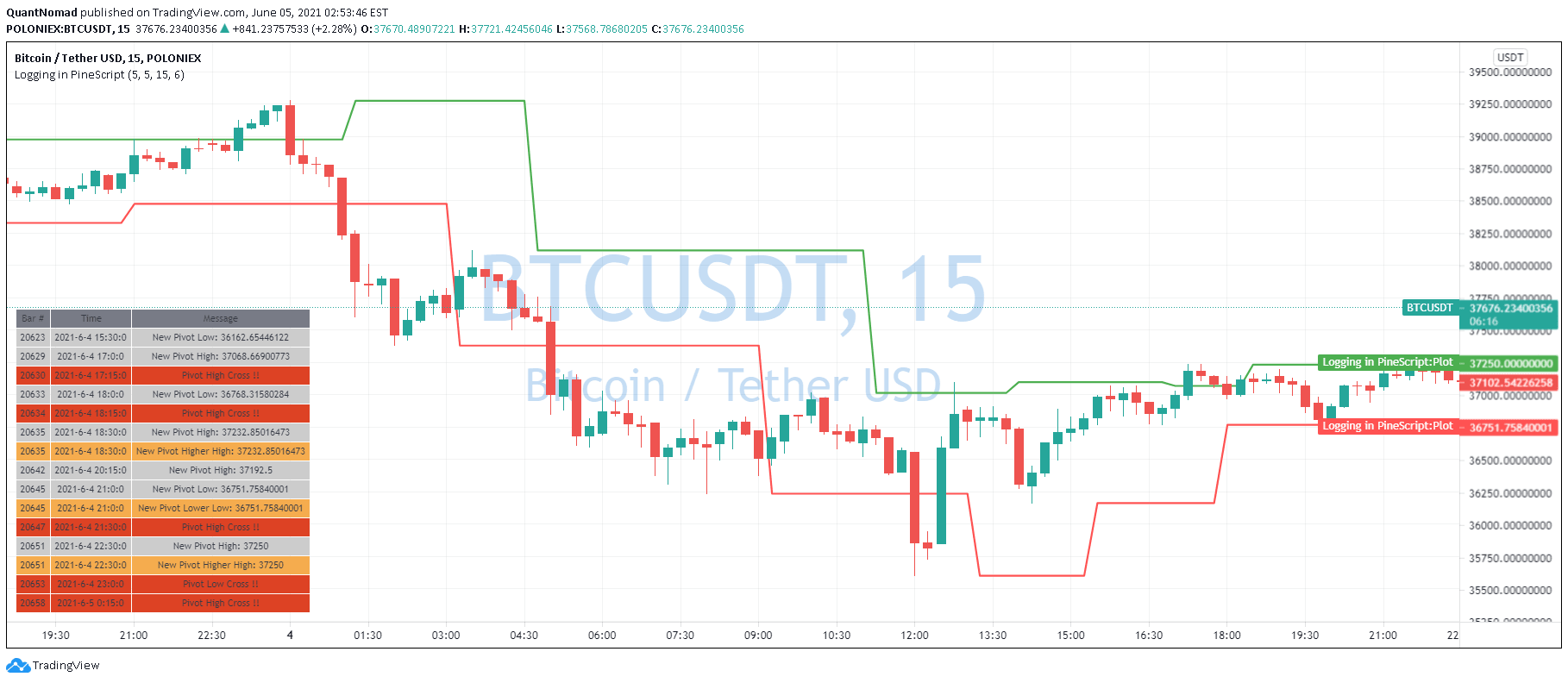
This custom logger utilizes arrays to capture and store debug messages during indicator development. Each message is associated with a bar number, timestamp, and message type (message, warning, error).
The function log_msg appends new messages to these arrays. On the final bar, a table is generated displaying the most recent messages, allowing developers to track and review critical information about their trading indicators
Why it may be useful
Debugging complex trading indicators can be challenging, especially in Pine Script where traditional debugging tools are limited. This custom logging approach provides traders and developers with a systematic method to track code execution, identify potential issues, and understand the internal state of their indicators.
By using color-coded messages and a flexible table display, developers can quickly diagnose problems and improve their trading strategies
When to explore it
This logging utility is most valuable when developing complex trading indicators or strategies that require detailed tracking of internal processes. It is particularly useful during initial development, testing, and refinement stages.
Traders can use this approach when they need to understand how their code performs under different market conditions, track specific calculations, or diagnose unexpected behavior in their Pine Script indicators
Keep exploring
What we’ve verified
Access, alerts and repainting behaviour have not been independently verified for this indicator. Check the creator’s current publication and settings.
General descriptions and classifications are recovered research. Verified details above identify the specific checks we have completed. Check the creator’s current publication for later changes.


